 Forgot your password ?
  Back to login
Automatic Menu Updates: The Smarter Way to Manage Your Digital Menus with DsMenu
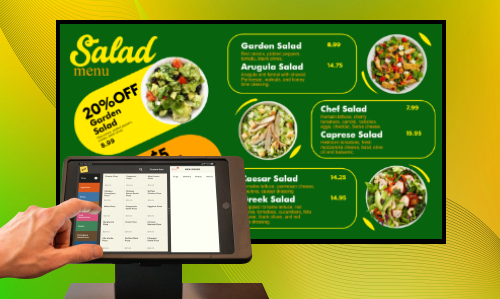
_f62de981-c007-4c40-ba70-6bc6253ab18c.png)
In today’s fast-paced restaurant industry, keeping your menu up to date is critical. Prices change, new dishes get added, and seasonal specials come and go. But updating your digital menus manually across multiple screens can be time-consuming — and mistakes are easy to make.
That’s why DsMenu, the leading digital menu board software, now offers a revolutionary feature: Automatic Menu Updates. This new addition is designed to make menu management effortless, accurate, and fully automated.
What Are Automatic Menu Updates?
Automatic Menu Updates in DsMenu let you connect your digital menu boards directly to an online data source — such as a Google Sheet, Excel file, or your POS system. Once linked, your menus will automatically refresh every time you update the data.
No more logging in, editing, or republishing. Your screens update themselves in real time.
Key Benefits of Automatic Menu Updates in DsMenu
1. Save Time and Effort
Update once, display everywhere! Any change you make in your data source — like a price change or new item — instantly appears on all connected digital menu boards.
2. Keep Menus Accurate
Eliminate human errors. Automatic syncing ensures every screen shows the correct prices and items 100% of the time.
3. Effortless Multi-Location Management
For restaurant chains or franchises, DsMenu’s auto-update feature guarantees consistent menus across all locations, while still allowing local branches to personalize certain sections.
4. Perfect for Dynamic Menus
Easily manage daily specials, happy hour deals, or limited-time offers. Just update your sheet, and your menus refresh automatically — no need to re-upload designs.
5. Zero Downtime
Your menus stay live while updates happen in the background. Smooth, seamless, and stress-free.
How DsMenu’s Automatic Menu Updates Work
Connect Your Data Source
POS system to DsMenu.
Design Your Menu Layout
Use DsMenu’s easy drag-and-drop designer to assign menu fields (like Item Name, Price, and Description) to your data.
Activate Auto-Sync
Turn on “Connect Menu Updates” in your DsMenu settings.
Relax — Your Menus Stay Updated Automatically!
DsMenu checks for new updates regularly (or instantly, if using live sync), and your digital boards refresh automatically.
Integration Options
DsMenu’s automatic update system works smoothly with various data sources:
 POS System Integration – Syncs your live restaurant menu directly from your sales system.
CSV/Excel File Uploads – For offline or batch menu updates
This flexibility makes DsMenu a powerful tool for both small cafés and large restaurant chains.
Secure, Reliable, and Cloud-Based
Your data is always safe with enterprise-grade encryption and secure cloud storage. DsMenu ensures your menus update accurately and reliably — even during peak business hours.
Why Automatic Updates Are a Game-Changer for Restaurants
Digital menu boards are no longer just about displaying your dishes — they’re about efficiency, brand consistency, and customer experience. With automatic menu updates, restaurants can:
Reduce operational costs
Prevent pricing discrepancies
Speed up menu rollouts
Deliver real-time promotions instantly
Whether you run a single café or manage multiple restaurant locations, DsMenu’s automatic menu update feature will save you time and make your operations smoother than ever.
Get Started with Automatic Menu Updates Today
The Automatic Menu Update feature is available for DsMenu Pro and Enterprise users.
To activate it:
Log in to your DsMenu dashboard.
Navigate to Settings ? Data Sync ? Automatic Updates.
Connect your data source and enable auto-sync.
It’s that simple — your menus will now update automatically!
Final Thoughts
Keeping your digital menus updated shouldn’t be a hassle. With DsMenu’s Automatic Menu Updates , you can focus on serving great food while your menus stay perfectly updated — all by themselves.
DsMenu continues to lead the way in digital menu board software, helping restaurants modernize operations, enhance branding, and improve the customer experience.
Start simplifying your menu management today!
?? Visit www.dsmenu.com to learn more or contact our support team to enable Automatic Menu Updates for your account.
digital menu board software DsMenu app automatic menu updates restaurant menu management update digital menu automatically POS integrated menu system DsMenu automatic updates